
DamonPS2
Screenshots
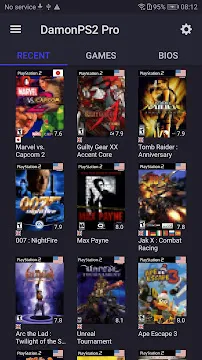
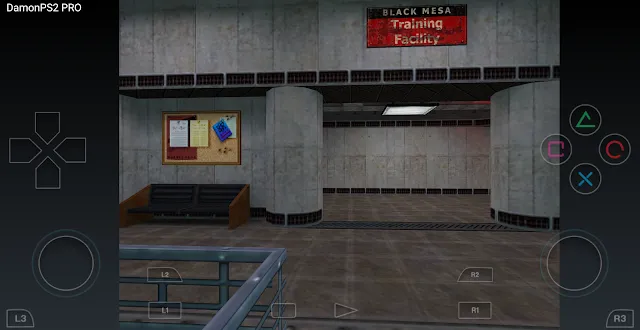
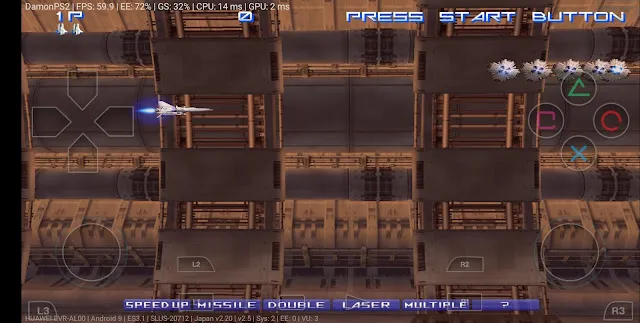
DamonPS2 changes how retro gaming fans experience their favorite classic titles on the go. Many players miss the golden era of 128-bit gaming. Therefore, developers created a solution to run these iconic titles directly on modern smartphones. You can enjoy massive role-playing games or fast-paced racing titles without owning the original console hardware.
However, running console games on a phone requires advanced emulation technology. DamonPS2 uses smart optimization techniques to replicate the complex architecture of the classic console. Consequently, gamers can rebuild their childhood memories anywhere at any time.
Because mobile devices now possess strong processors, portable emulation runs smoother than ever before. This article explores how this software works. Furthermore, we will guide you through the setup process and optimization methods.
Many players remember spending hours playing tactical games or action adventures on a home console. Those days were filled with unforgettable stories and challenging gameplay. By using this emulator, you can bridge the gap between old consoles and modern portability.
What is the DamonPS2 Emulator?
The DamonPS2 Emulator is a high-speed emulation program built specifically for modern mobile chipsets. It mimics the internal components of the famous PlayStation 2 console. Because of this clever design, the software can read game files directly from your phone storage. Gamers usually load these files in standard formats like ISO or BIN.
Historically, emulating this specific home console was very difficult due to its unique chip architecture. However, developers optimized the DamonPS2 Emulator to handle complex graphics commands efficiently. As a result, the tool successfully boots over ninety percent of the console library. Some games display minor graphical glitches, but many run flawlessly at full speed.
Furthermore, users must understand that the emulator does not contain pre-installed games. You must provide your own legal backup copies of your discs. Additionally, the system requires a separate system file known as a BIOS to launch the software environment. Then, the console interface loads, and you can jump straight into the action.
The emulation software translates complex instruction sets into a language that your phone processor understands. This translation happens instantly as you move through different virtual worlds. Therefore, the system demands constant synchronization between the audio tracks and visual layers.
Core Features of this Retro Tool
This emulation software offers several advanced configuration choices to improve your overall gaming experience. For instance, the software supports high-definition rendering up to five times the native console resolution. Therefore, classic titles look sharp and crisp on high-resolution smartphone displays. Textures look clear, and jagged edges disappear completely.
Next, let’s look at the control mechanisms. The program features fully customizable touchscreen controls that match the original gamepad layout. However, some players prefer tactile feedback during intense combat segments. Fortunately, the tool offers excellent compatibility with external physical gamepads via Bluetooth or USB connections.
Additionally, the software features multiple save slot options. The free version utilizes emulator save states, while the premium version enables traditional memory card saving. Consequently, you will never lose your campaign progress. The tool also supports widescreen hacks for a more immersive view on modern phone screens.
Furthermore, the software enables users to create separate setting profiles for individual games. This means you can save specific resolution configurations for a racing game without affecting an RPG title. Consequently, you save time because you do not have to modify global settings every single time.
The picture below displays a standard configuration. You can see the on-screen buttons covering the edges of the display. This layout ensures you can access every function easily with your thumbs.
How to Install the DamonPS2 Emulator APK
Installing the DamonPS2 Emulator requires a few simple adjustments to your device security settings. Because the installation package comes directly from a file download, your browser might flag it initially. Therefore, you must grant permission to install files from unknown sources. Follow the step-by-step guide below to configure the tool correctly.
- Download the APK File:
- Visit the download link on our trusted webpage. Save the latest version of the APK file directly into your phone download folder.
- Allow Unknown Sources:
- Open your device settings menu. Navigate to the security tab and enable the installation option for unknown sources.
- Run the Installer:
- Locate the downloaded file using a file manager. Tap the icon and select the install option to begin the process.
- Obtain the System BIOS:
- Place a valid system BIOS file into a dedicated folder on your local storage storage. The emulator needs this to boot.
- Load Your Game ISO:
- Launch the DamonPS2 Emulator. Direct the directory path to your game files, select your game, and enjoy playing.
After completing these setup steps, the DamonPS2 Emulator is ready to execute your favorite retro titles. Make sure your files remain uncompressed for the best loading speeds.
System Requirements for Smooth Gameplay
Emulating a 128-bit system requires a significant amount of computing power from your mobile processor. Therefore, older or entry-level phones might struggle to maintain acceptable frame rates. To enjoy an optimal experience, your device must meet specific hardware baselines.
First, let’s examine the central processing unit requirements. The program runs best on devices equipped with high-end processors like Snapdragon 835 or newer chipsets. If your phone contains a weaker processor, you will likely experience audio stuttering and slow gameplay. Furthermore, the graphics chip must support OpenGL ES 3.0 or the Vulkan API.
Next, system memory plays a critical role in stability. Your device needs at least four gigabytes of random-access memory to handle asset streaming. However, eight gigabytes of memory is highly recommended for heavier open-world games. Additionally, ensure your operating system is updated to version 7.0 or higher to maintain software compatibility.
Beyond processing power, you must consider your internal storage capacity. PlayStation 2 game files are notoriously large, often ranging between two and four gigabytes per title. Therefore, having a fast solid-state storage drive or a high-speed memory card ensures quicker loading screens.
Why Choose the DamonPS2 Emulator for Mobile Gaming?
Choosing the DamonPS2 Emulator allows you to carry an entire library of nostalgic titles inside your pocket. In the past, players needed to sit in front of a television to enjoy these adventures. Now, you can complete complex quests during your daily train commute or while waiting in line.
Furthermore, this software provides a highly customizable environment for retro enthusiasts. For instance, the free edition lets you test game compatibility without spending any money. If you want an ad-free experience, you can upgrade to the premium tier later. The premium upgrade also unlocks high-definition rendering settings and gamepad vibration effects.
Additionally, developers update the engine regularly to enhance game speed and fix graphic bugs. Consequently, the list of playable titles expands with every passing month. This consistent support makes the DamonPS2 Emulator a reliable option for long-term retro gaming.
Think about the space you save by shifting to a digital retro format. A single physical console setup requires wires, memory cards, controllers, and large plastic game cases. Instead, this emulator bundles all those physical components into a neat digital format right inside your coat pocket.
Important Tips to Enhance Performance
Sometimes, demanding games might slow down even on relatively modern smartphone hardware. Fortunately, you can adjust several internal options within the settings panel to boost your frame rate. Implementing these small tweaks can fix annoying lag spikes.
First, experiment with the rendering resolution settings. If a title stutters at three-times resolution, lower the setting to native or two-times resolution. This action reduces the strain on your graphic processor immediately. Next, consider turning on multi-threading acceleration options. This feature forces the emulator to distribute the processing load across multiple CPU cores.
Furthermore, some advanced users improve frame rates by modifying system cooling parameters or deleting specific thermal configuration files. However, you must exercise extreme caution with this method because it can cause your device to overheat. Instead, stick to the built-in frame-skipping tools to bypass demanding graphic sequences smoothly.
Another crucial adjustment involves the audio synchronization method. If you notice that the sound lags behind the action on screen, try switching the audio plugin mode. Changing this configuration often resolves timing discrepancies. Thus, the gameplay feels much tighter and more responsive.
Conclusion
DamonPS2 represents a remarkable achievement in portable emulation technology. It gives gamers the unique opportunity to revisit legendary titles right from their hand. Although the system requires a capable smartphone and proper configuration files, the eventual reward is massive. You get instant access to hundreds of timeless gaming adventures without any hassle.
Simply download the file, configure your system BIOS, and load your preferred game images. Then, watch your smartphone transform into a fully functional retro game machine. Download the package today and start your journey back to the golden era of console gaming.